SMS consent
Last updated: June 11, 2026
This page describes how users opt in to text messages from Grapevine (assistant “G”), operated by Jordan & Landers LLC. Messages are delivered on Grapevine’s G line via Blooio and may arrive as iMessage, SMS, or RCS, depending on your device and carrier. The same disclosure appears in the Grapevine iOS app during onboarding.
The G line — you text G first
Grapevine uses an inbound-first messaging model on a shared business line. After you opt in during onboarding, you must send the first message to G from the phone number you registered (for example, “hey G”). Grapevine does not cold-start conversations or send proactive texts until you have started a thread with G on that number.
Once you have texted G, Grapevine may send recurring automated messages about your account — including weekly check-ins, friend proximity alerts, and plan-related prompts you can reply to.
In-app opt-in (primary)
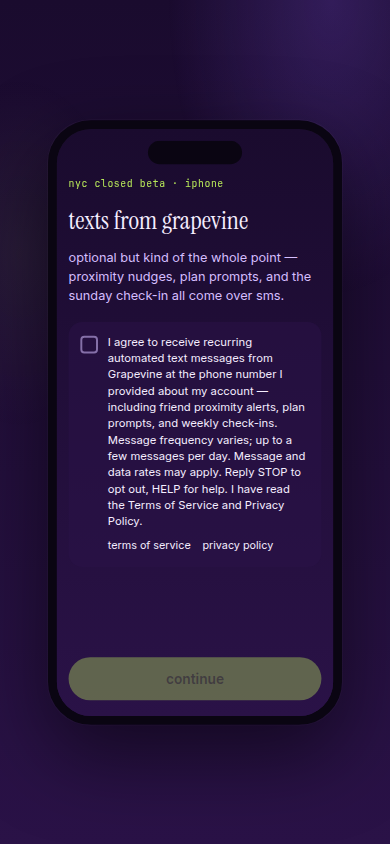
During iOS onboarding — after the user sets their social frequency preference and before location setup — they must check this box to continue:
The checkbox is unchecked by default. Users cannot enable Grapevine messaging until they check it and continue onboarding.
A2P reviewers: interactive iOS screen mock · screenshot (PNG)
What we send
Examples of Grapevine messages on the G line (not marketing blasts to non-users). On iPhone, these typically arrive as iMessage when your carrier and device support it; otherwise as SMS or RCS:
- Weekly Sunday check-in about plans;
- Friend proximity or “open plans” nudges you can reply to;
- Coordination messages you trigger by using the Service.
Opt-out
Reply STOP to end all Grapevine text messages on the G line (iMessage, SMS, and RCS). Reply HELP for support: support@grapevineapp.xyz.
Not covered here
Invites to join Grapevine are sent by users from their own phone via Apple Messages — not from Grapevine’s G line.